One daily log the whole team can read.
Consistent people make consistent people.
Nobody gets disciplined by wanting it more. They get there by standing next to people who already are. Daily Tracker puts your routines, your streak and your score right next to everyone else's, so showing up stops being a private decision.
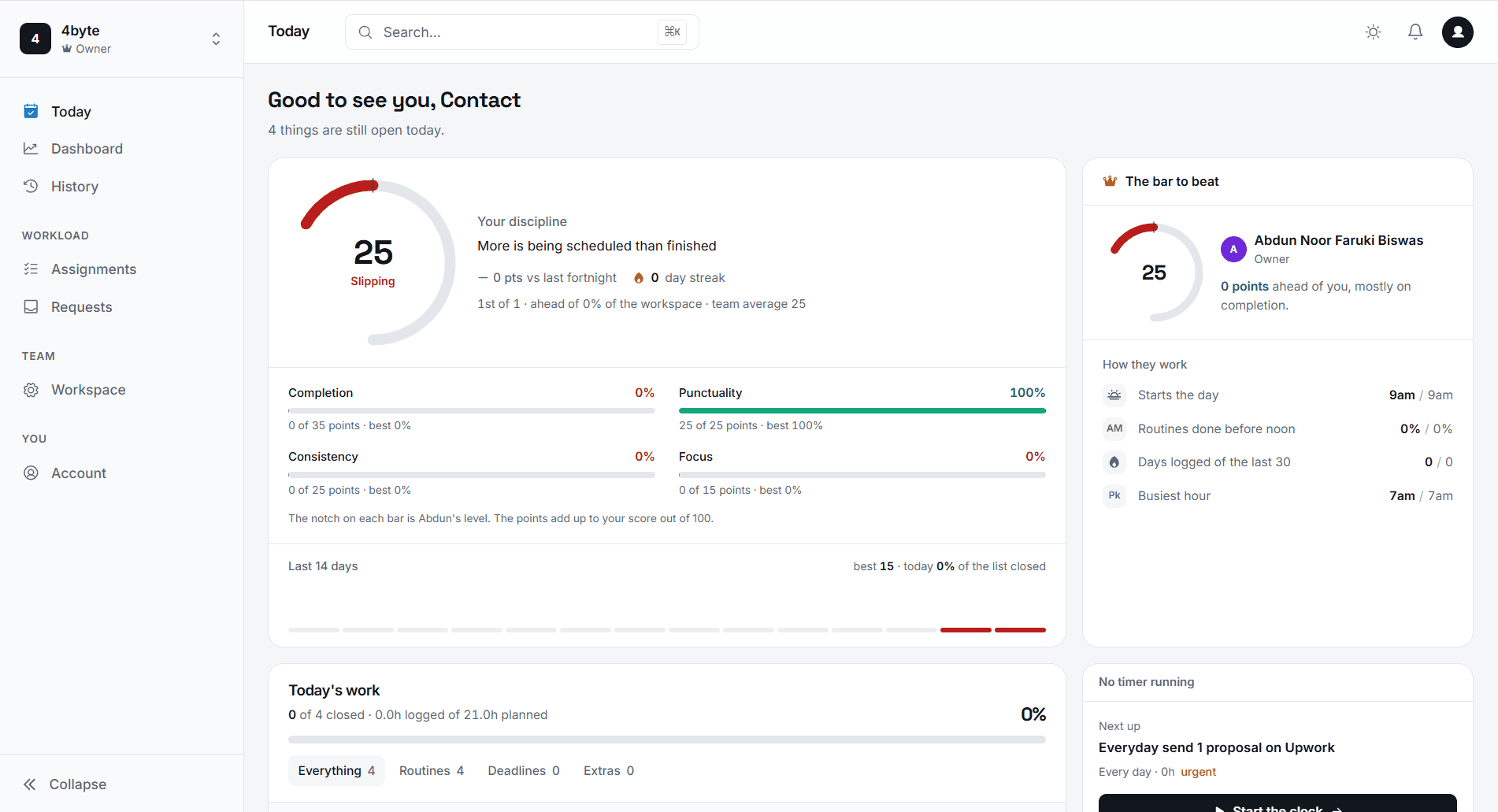
The day opens with a list, not a blank page.
Routines appear on the days they are scheduled for. Weekly, every-other-day, weekdays only. Nothing to set up each morning.
Most teams are already tracking their days. In a spreadsheet.
It works right up until someone else needs to read it. This is the same habit, with the parts that rot taken out.
The spreadsheet
Daily Tracker
A tab per person, and a tab nobody updates.
One workspace. Everyone reads the same day.
Recurring work retyped every Monday.
Routines repeat on the days you set, on their own.
Hours reconstructed on Friday afternoon.
Timers run while the work happens, and bank on pause.
Percentages that only mean something to whoever wrote the formula.
One completion figure, counted the same way every day.
Anyone can overwrite anything.
Owners write, members read. Enforced in the database.
A timer that survives the way people actually work.
Start, pause for the interruption, come back, finish tomorrow. The banked time follows the task instead of resetting.
Time is captured where the work is logged
No separate stopwatch, no second app to remember. The clock lives on the task row itself.
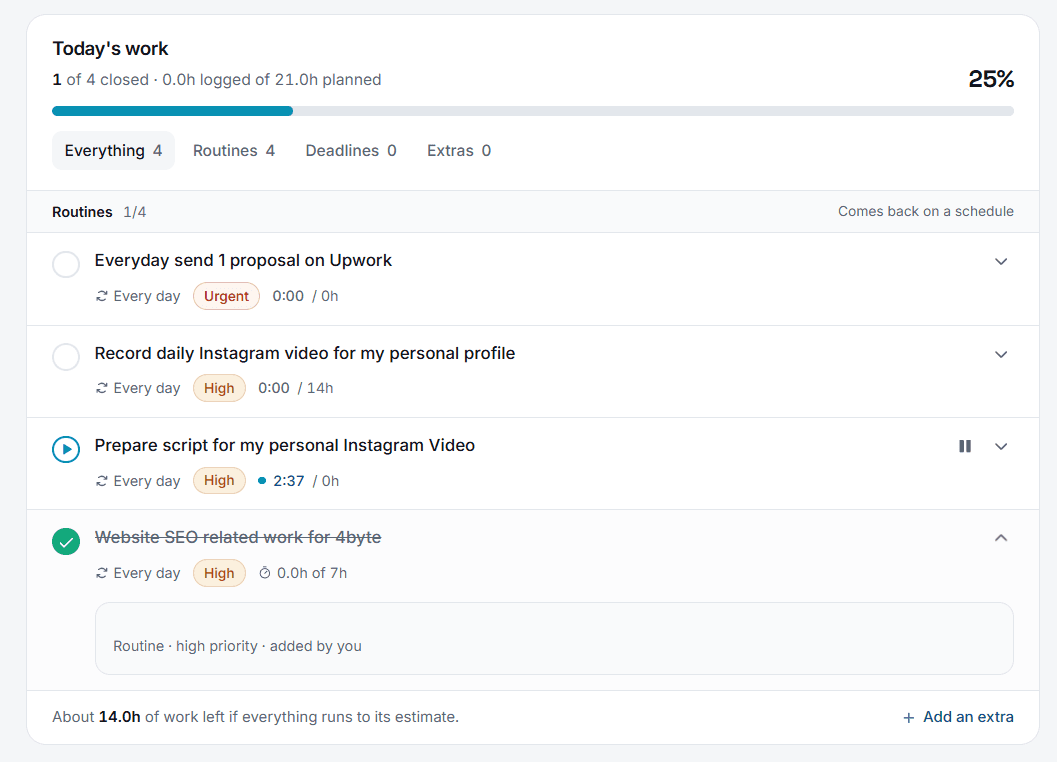
Pause banks the time
Elapsed time is computed on the server from the stored row, so a closed laptop or a refreshed tab changes nothing.
Schedules that match the work
Daily, chosen weekdays, or every N days from an anchor date.
Checklists that come back
Save subtasks on a routine and they rebuild each scheduled day.
Independent child timers
Each subtask runs its own clock. Pausing the parent banks all of them.
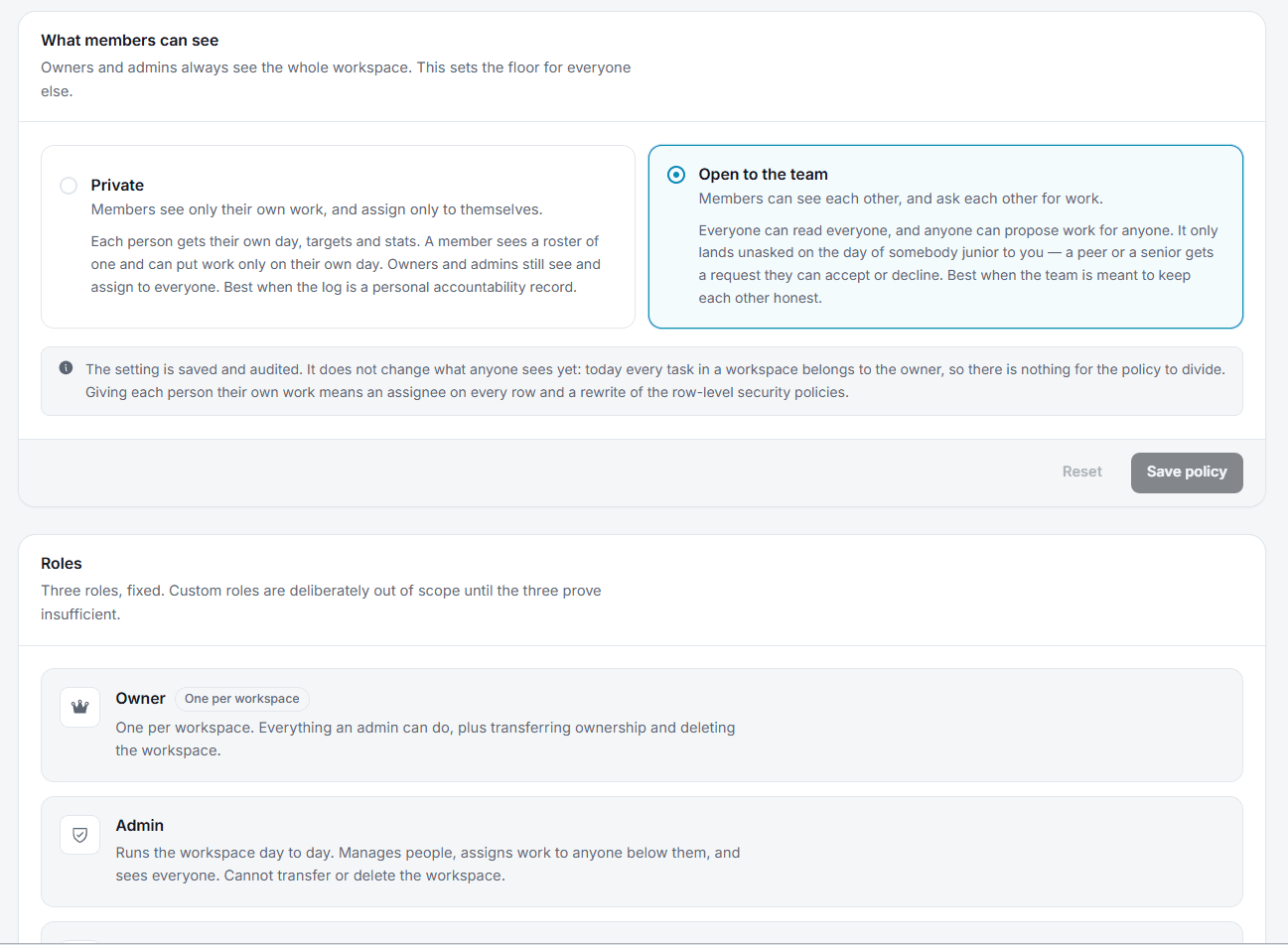
Members can propose work. Only owners can change it.
Everyone in a workspace reads the same day. Writing is the owner's, so the log stays a record rather than a negotiation.
Every request lands in one place
Pending, approved and rejected, all in the same screen an owner already checks.
One approval closes the loop
A request waits for a decision. Approve and the task appears on the log; reject with a reason and the requester is told either way.
Proposes a task with a note explaining why. Recurring, a deadline, or a one-off for today.
Gets an email and a live notification, then approves or rejects with a reason.
On approval the task is created and the requester is told, without anyone chasing.
Twelve weeks of evidence, not a feeling about how it went.
Daily completion rolls up by week and by month, alongside which routines you actually keep and which ones you quietly abandoned.
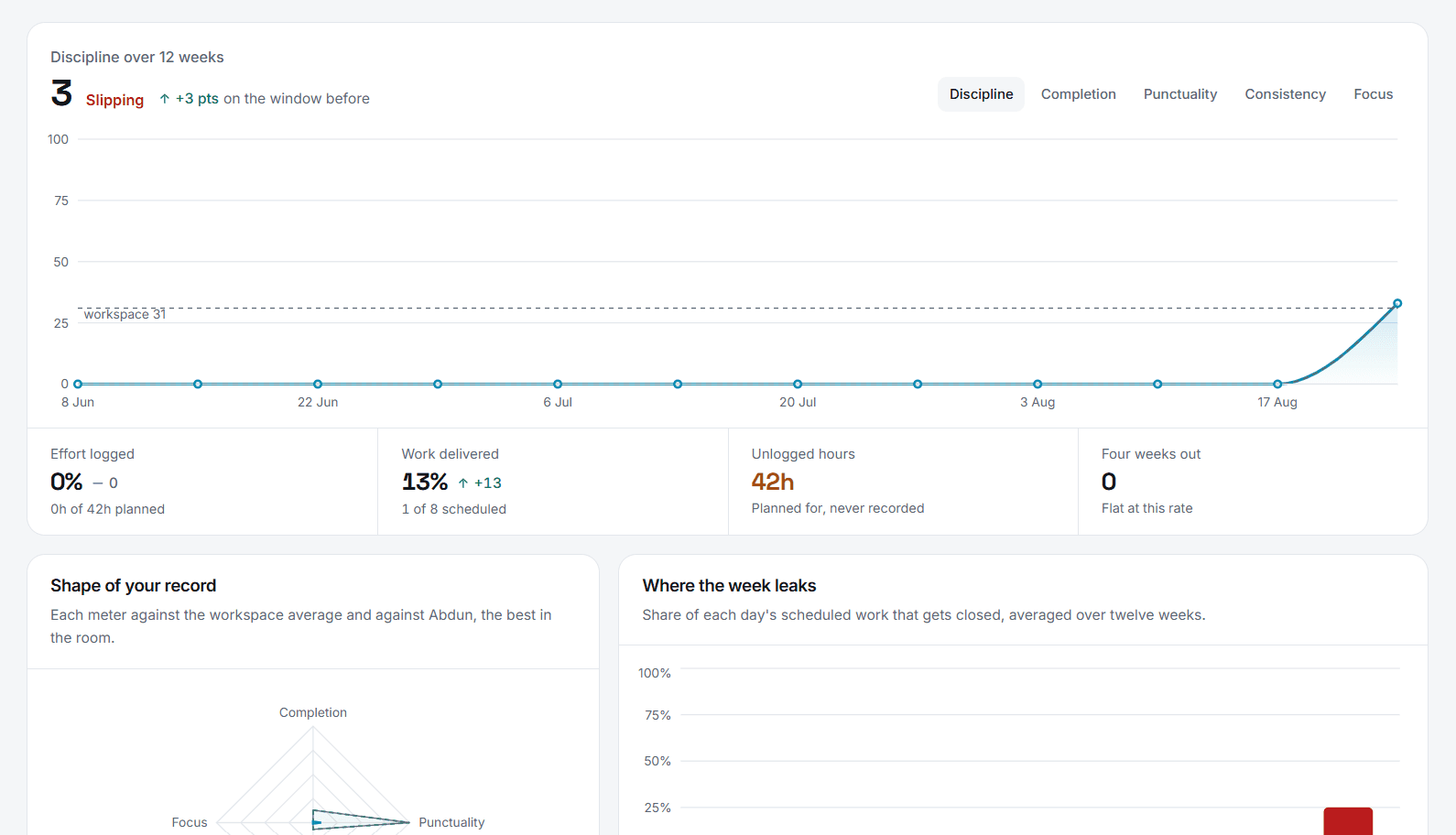
Every day is on the record. So is everyone else's.
A calendar of what actually happened, the days you showed up and the ones you missed, colour-coded by the score each one landed on.
A calendar, not a single number
Every logged day sits in the grid with the score it earned. Pick one and it opens in full, exactly as it was logged.
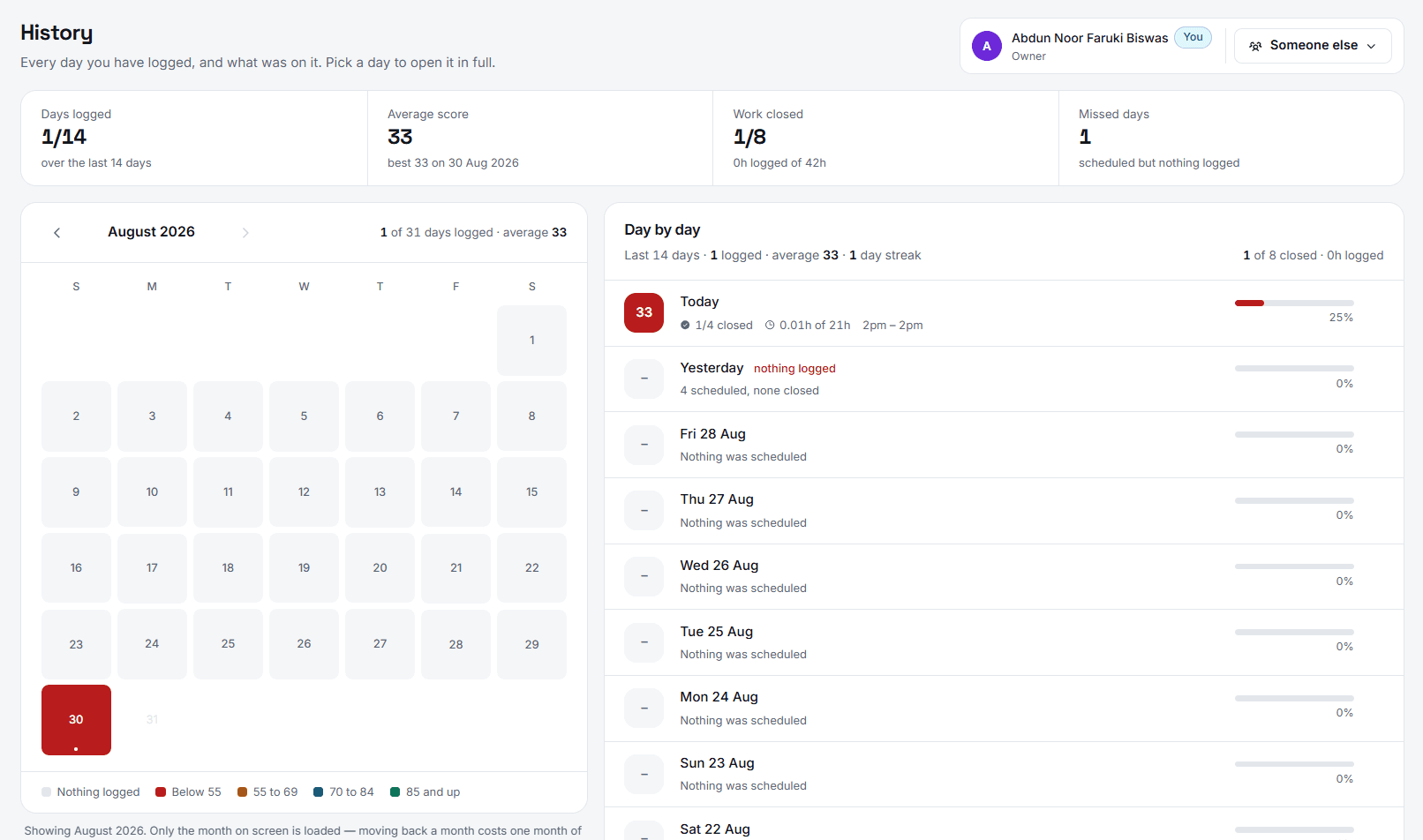
One switch, someone else's record
The header carries a name, not just you. Pick a teammate and the same calendar, the same list, render for their days instead.
Colour before you open a day
A bad week is visible in the grid itself, before a single day is opened.
Completion, punctuality, hours
Each entry keeps the figures that made up its score, not just the total.
Missed days count too
A day that was scheduled and skipped still shows, so gaps stay visible.
A shared log is only useful if the walls are real.
Isolation is enforced by the database
Row level security policies decide what every query can see. A request for another workspace returns nothing, whatever the client asks for.
The API runs as you, not as an administrator
Each request is executed with the caller’s own credentials, so the same policies apply to the server as to the browser.
Your data leaves with you
Delete a workspace and every task, check, timer and note under it goes with it, in the same transaction.
In plain terms
A shared daily log for routines, deadlines and timed work, scored the same way every day so a small team can see where its time actually went.
What Daily Tracker is
Daily Tracker is a shared daily work log for small teams. Every person tracks their recurring routines, deadlines and one-off tasks in one place, runs a live timer on any task, and closes each day with a single completion score. Everyone in a workspace reads the same log, so daily accountability stops being a private decision.
A spreadsheet replacement, not a project tool
Most teams already track their days in a shared spreadsheet, and it works until someone else needs to read it. Daily Tracker keeps that habit and removes the parts that rot: routines repeat on their own instead of being retyped, timers run while the work happens instead of being reconstructed on Friday, and one completion figure is counted the same way every day.
An asynchronous alternative to the daily standup
Because every teammate’s routines, timers and completion score sit in one shared log, an owner can see where the day went without a meeting or a written check-in. Members propose new work with a note and owners approve it; the log stays a record rather than a negotiation.
Routine tracking with real time on each task
A routine can run daily, on chosen weekdays, or every N days from a start date, and only appears on the days it is scheduled for. Start a task and its timer runs; pause and the time banks against that task. Elapsed time is computed on the server, so a closed laptop never loses it, and twelve weeks of daily completion roll up into weekly and monthly trends.
Free. No catch, no limit.
Every part of Daily Tracker - routines, timers, history, the whole team - is free to use. There's nothing to unlock later.
Everything Daily Tracker does, for every workspace.
- Unlimited routines, deadlines and extras
- Timers with pause and resume
- Full dashboard and history
- As many members as your workspace needs
- Member requests with owner approval
- Email and in-app notifications
- Installable on desktop and phone
Questions people ask before they start.
Daily Tracker is a shared daily work log for small teams. Each person tracks their routines, deadlines and one-off tasks in one place, with live timers on every task and a single completion score for the day. Everyone in a workspace reads the same log, so daily accountability stops being a private decision.
A to-do list tracks what to do; Daily Tracker tracks what actually happened. Recurring routines rebuild themselves on their scheduled days, timers bank real time against each task, and every day is scored the same way and kept on the record. It is built to replace the shared spreadsheet a team uses to log its days, not to plan projects.
Yes, for status. Because every teammate’s routines, timers and completion score sit in one shared log, an owner can see where the day went without a meeting or a written check-in. It is an asynchronous record rather than a standup bot.
Open the task and correct the hours by hand. The note drawer takes an explicit figure, and that figure is what the day counts. Nothing is locked after the fact.
No. Members read everything in the workspace and can propose new work, but only the owner can create, change or complete a task. That boundary is enforced by the database with row level security, not by hiding buttons.
Routine tasks completed plus extra tasks completed, divided by the routines scheduled for that day plus the extras you took on. A day starts counting the moment you touch anything on it, so the figure is comparable to every other day.
No. A routine can run daily, on chosen weekdays, or on an interval such as every third day counted from a start date. It only appears on days it is scheduled for.
It installs as a progressive web app on desktop and phone and keeps its shell available, but logging needs a connection. Timers are computed on the server, so a dropped connection never loses banked time.
Yes. One account can own several workspaces and be a member of others. Each has its own tasks, members and history, and nothing crosses between them.
Daily Tracker is free for one person, with the full tracker - routines, deadlines, timers, and the 90-day dashboard and history. Team workspaces, where other people can read your log, are billed per member per month.
Stop being consistent alone.
Make an account, add your first routine, and put it somewhere someone else can see it.